Container Management in Microsoft Azure: A Developer’s Guide
· originally published on Medium

#Introduction
Containers have revolutionized how we build, ship, and run applications. If you’ve been working with Docker locally or exploring Kubernetes with K3s, you might be wondering how to take your containerized applications to the cloud efficiently. Microsoft Azure offers a comprehensive suite of container services, each designed for different use cases and operational requirements.
In this article, I’ll walk you through Azure’s container ecosystem based on my experience in enterprise R&D, helping you understand which service fits your needs and how they compare to the tools you might already know.
#Why Containers in the Cloud?
Before diving into Azure’s offerings, let’s quickly recap why containers matter:
Consistency Across Environments: Containers package your application with all its dependencies, ensuring it runs the same way in development, testing, and production. No more “it works on my machine” problems.
Resource Efficiency: Unlike virtual machines, containers share the host OS kernel, making them lightweight and fast to start. You can run multiple containers on the same hardware, optimizing your infrastructure costs.
Scalability: Containers can be quickly replicated to handle increased load, and orchestration platforms can automatically scale them based on demand.
Portability: Once containerized, your application can run anywhere — on-premises, in the cloud, or in hybrid environments.
Moving containers to Azure adds enterprise-grade infrastructure, managed services, and seamless integration with Azure’s ecosystem of databases, networking, and security tools.
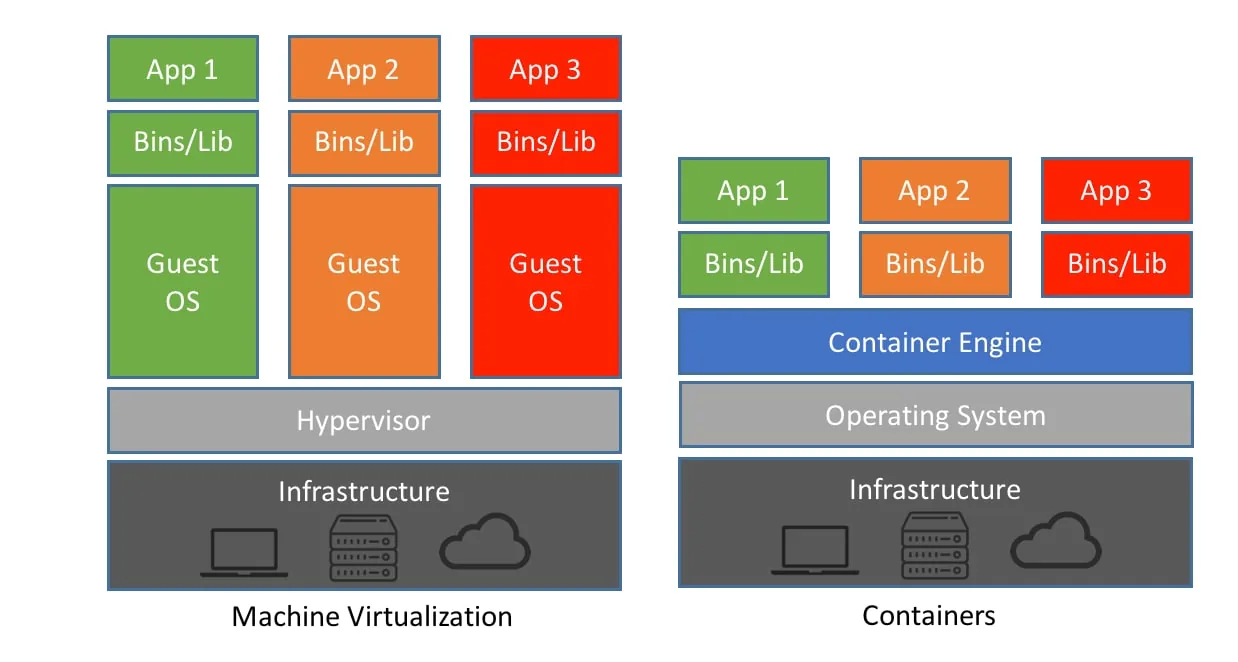
#Azure’s Container Service Landscape
Azure provides four primary services for running containers, each serving different scenarios:
#1. Azure Container Instances (ACI)
What it is: The simplest way to run containers in Azure. Think of it as “containers as a service” — you provide a container image, and Azure runs it without managing any underlying infrastructure.
When to use it:
- Quick proof-of-concepts and development testing
- Batch jobs and task automation
- CI/CD build agents that need to spin up quickly
- Applications with unpredictable or bursty workloads
Key characteristics:
- Fastest deployment: Containers start in seconds
- Per-second billing: You only pay for the exact time your container runs
- No infrastructure management: No clusters, nodes, or orchestrators to maintain
- Limited orchestration: Good for simple scenarios, not complex microservices
Real-world example: In our R&D pipeline at Maybank, we use ACI for running automated security scans that need to execute quickly without maintaining dedicated infrastructure.
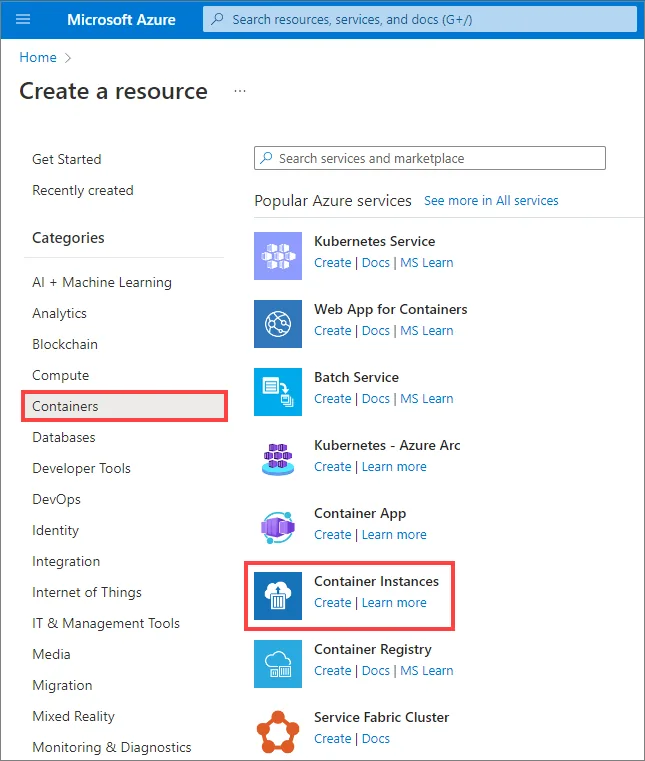
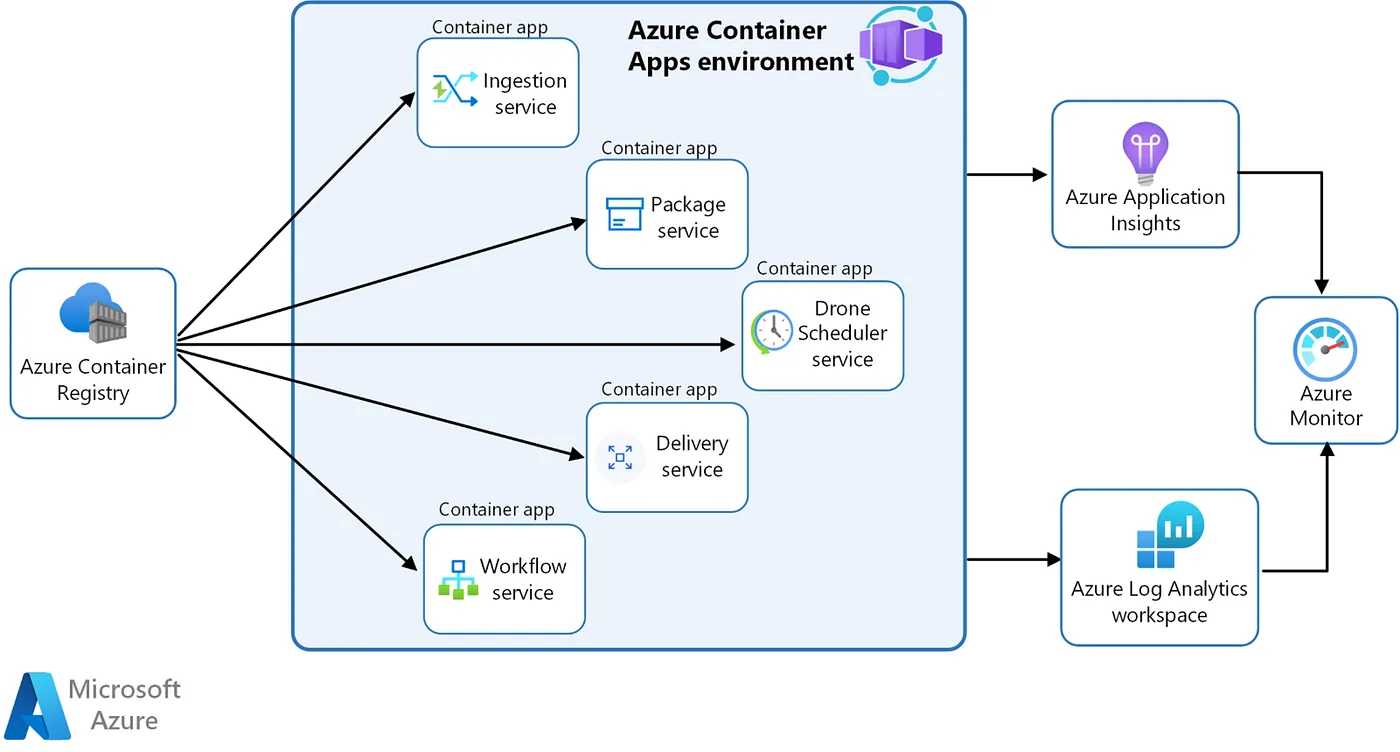
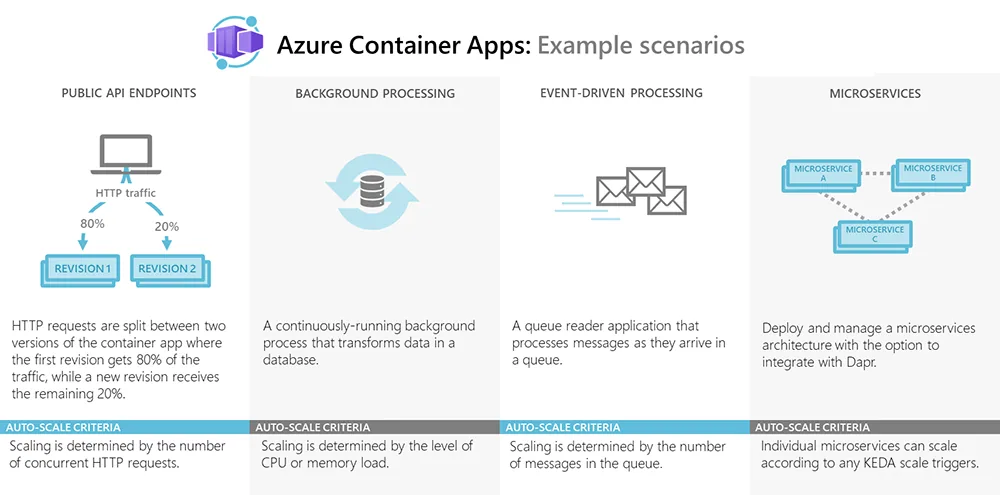
#2. Azure Container Apps
What it is: A fully managed serverless container platform built on Kubernetes. It’s designed for microservices and event-driven applications without requiring Kubernetes expertise.
When to use it:
- Microservices architectures
- API backends and web applications
- Event-driven processing workloads
- Applications that need automatic scaling to zero
Key characteristics:
- Serverless experience: Automatic scaling including scale-to-zero
- Built-in features: Includes ingress, service discovery, and distributed tracing out-of-the-box
- KEDA integration: Event-driven autoscaling based on queue depth, HTTP traffic, or custom metrics
- Simpler than AKS: Kubernetes power without the complexity
Comparison to what you know: If you’ve used Docker Compose to define multi-container applications, Container Apps provides a similar experience but with enterprise-grade scaling, load balancing, and zero-downtime deployments managed for you.
#3. Azure Kubernetes Service (AKS)
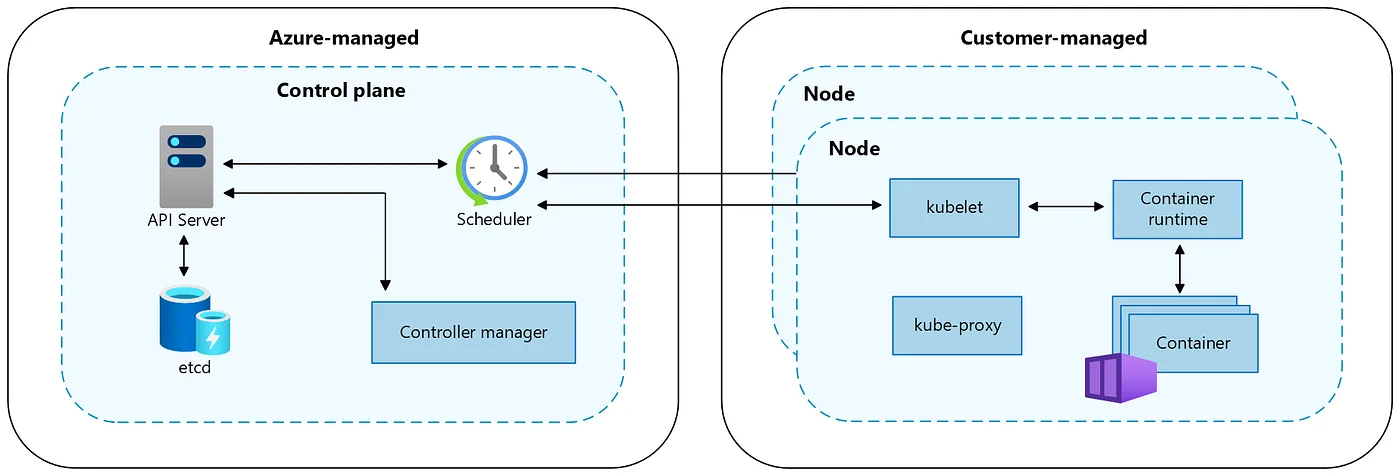
What it is: Managed Kubernetes service that provides full control over your container orchestration while Azure handles the control plane.
When to use it:
- Complex microservices requiring advanced orchestration
- Applications needing specific Kubernetes features or operators
- Multi-region deployments with sophisticated traffic routing
- When you need full control over cluster configuration
Key characteristics:
- Full Kubernetes API: Complete control and customization
- Managed control plane: Azure handles Kubernetes master nodes
- Advanced networking: Support for CNI, Network Policies, and service mesh integration
- Enterprise features: Integration with Azure AD, Azure Monitor, and Azure Policy
Comparison to K3s: If you’ve worked with K3s (lightweight Kubernetes), AKS is conceptually similar but enterprise-grade. K3s is excellent for edge computing and development, while AKS is designed for production workloads at scale with enterprise security and compliance features.
Key difference: In K3s, you manage everything including the control plane. In AKS, Azure manages the Kubernetes control plane (API server, etcd, scheduler) while you manage the worker nodes and workloads.
#4. Azure App Service for Containers
What it is: Part of Azure’s PaaS offering, App Service can run custom containers while providing a fully managed hosting environment.
When to use it:
- Web applications and APIs in standard frameworks
- When you want PaaS benefits with custom container flexibility
- Applications that fit the web app hosting model
- Teams familiar with App Service wanting to use custom images
Key characteristics:
- PaaS simplicity: Deployment slots, auto-scaling, and managed certificates
- Continuous deployment: Integrated CI/CD from container registries
- Hybrid approach: Use custom containers but get PaaS management
- Limitations: Primarily for web workloads, not general-purpose container hosting
#Choosing the Right Service: Decision Framework
Selecting the appropriate Azure container service depends on your specific requirements:
Start with ACI if:
- You’re running simple, standalone containers
- Your workload is temporary or intermittent
- You don’t need orchestration features
- Time-to-deployment is critical
Choose Container Apps if:
- You’re building microservices but don’t need full Kubernetes
- You want serverless benefits with container flexibility
- Event-driven scaling is important
- You prefer managed ingress and networking
Go with AKS if:
- You need full Kubernetes capabilities
- Your architecture requires complex service mesh, operators, or CRDs
- You’re migrating existing Kubernetes workloads
- You need maximum control and customization
Consider App Service for Containers if:
- You’re already using App Service
- Your workload fits the web application model
- You want custom containers with PaaS simplicity
#Supporting Services: The Complete Picture
Azure’s container ecosystem includes essential supporting services:
#Azure Container Registry (ACR)
Your private Docker registry in Azure. It stores and manages your container images with enterprise features like:
- Geo-replication for multi-region deployments
- Vulnerability scanning with Azure Security Center
- Content trust and image signing
- Integration with AKS for automated image pulls
#Azure DevOps & GitHub Actions
Both provide excellent CI/CD integration with Azure container services. You can build container images, push to ACR, and deploy to any Azure container service with built-in tasks and actions.
#Azure Monitor & Container Insights
Comprehensive monitoring for containerized applications, providing metrics, logs, and performance data. For AKS, Container Insights offers detailed cluster health, node performance, and container metrics.
#Getting Started: A Practical Example
Let’s look at a simple workflow to illustrate the differences:
Scenario: You have a Node.js API containerized with Docker, and you want to deploy it to Azure.
With Azure Container Instances:
az container create \
  --resource-group myResourceGroup \
  --name myapi \
  --image myregistry.azurecr.io/myapi:latest \
  --cpu 1 --memory 1 \
  --registry-login-server myregistry.azurecr.io \
  --registry-username <username> \
  --registry-password <password> \
  --dns-name-label myapi-unique \
  --ports 3000
Result: Your API is running in under a minute with a public endpoint.
With Azure Container Apps:
az containerapp create \
  --name myapi \
  --resource-group myResourceGroup \
  --environment myenvironment \
  --image myregistry.azurecr.io/myapi:latest \
  --target-port 3000 \
  --ingress external \
  --registry-server myregistry.azurecr.io \
  --min-replicas 0 \
  --max-replicas 5
Result: Your API is deployed with automatic HTTPS, can scale to zero when not in use, and scales automatically based on HTTP requests.
With AKS: You’d create a Kubernetes deployment manifest, configure services, ingress, and potentially Helm charts. More complex but gives you complete control over networking, storage, and orchestration.
#Cost Considerations
Understanding the cost model is crucial for production deployments:
Azure Container Instances: Pay per second of execution time based on vCPU and memory allocated. Ideal for short-running tasks but can be expensive for always-on services.
Azure Container Apps: Consumption-based pricing with a generous free tier. You pay for vCPU and memory resources consumed, with the ability to scale to zero. Cost-effective for variable workloads.
Azure Kubernetes Service: You pay for the worker nodes (VMs) but not the managed control plane. Fixed costs for running nodes make it economical for consistent, high-utilization workloads.
Azure App Service for Containers: Pricing based on App Service Plan tiers. Predictable costs with included features like auto-scaling and deployment slots.
#Best Practices from R&D Experience
Based on my work in enterprise environments, here are key practices:
1. Start Small, Scale Intentionally Begin with simpler services like ACI or Container Apps for new projects. You can always migrate to AKS later if complexity demands it. Over-engineering with Kubernetes from day one often creates unnecessary operational burden.
2. Embrace Azure Container Registry Always use ACR rather than public registries for production workloads. The integration with Azure services, vulnerability scanning, and geo-replication are invaluable for enterprise deployments.
3. Implement Proper Monitoring Early Containers can fail silently. Set up Azure Monitor and application insights from the beginning. For AKS, enable Container Insights during cluster creation.
4. Security Scanning in CI/CD Integrate container scanning into your build pipeline. Azure Security Center can scan ACR images for vulnerabilities automatically, but you should catch issues before they reach the registry.
5. Use Managed Identities Instead of storing credentials in your containers, leverage Azure Managed Identities to authenticate to Azure services. This is supported across all container services and significantly improves security.
6. Plan for Disaster Recovery Use ACR geo-replication to maintain image copies across regions. For critical workloads on AKS, consider multi-region deployments with Azure Traffic Manager or Azure Front Door.
#Migration Paths
If you’re coming from Docker or K3s:
From Docker Desktop to Azure: Your Docker Compose experience translates well to Container Apps. The multi-container support and networking concepts are similar, but you gain automatic scaling and managed infrastructure.
From K3s to AKS: Your Kubernetes manifests work directly in AKS. The main differences are in managed services integration (use Azure disks instead of local storage, Azure Load Balancer instead of MetalLB, etc.). AKS also offers Azure CNI for advanced networking scenarios that K3s handles differently.
Tips for Migration:
- Start by containerizing one service at a time
- Use staging environments in Azure to test before production migration
- Leverage Infrastructure as Code (Terraform or Bicep) for reproducible deployments
- Test auto-scaling behavior under realistic load
#Conclusion
Azure’s container services offer a spectrum of options from the simplicity of Container Instances to the full power of Kubernetes with AKS. The key is matching the service to your needs:
- ACI for simple, short-lived tasks
- Container Apps for modern microservices without Kubernetes complexity
- AKS for full Kubernetes control and advanced orchestration
- App Service for web applications wanting container flexibility
My recommendation for teams new to Azure containers: start with Container Apps for most microservices workloads. It provides an excellent balance of simplicity and capability. As you encounter specific needs that Container Apps can’t address, you’ll be better equipped to evaluate whether AKS is necessary.
The beauty of containerization is portability. You can start with one service and migrate to another as your requirements evolve, without rewriting your application code.
#Next Steps
To continue your Azure container journey:
- Try Azure Container Instances: Create a free Azure account and deploy your first container in minutes
- Explore Container Apps: Build a simple microservices application with multiple containers
- Learn AKS fundamentals: Microsoft Learn offers free, hands-on AKS training paths
- Set up a CI/CD pipeline: Integrate Azure DevOps or GitHub Actions with ACR
The cloud-native future is containerized, and Azure provides the tools to make that transition smooth and manageable.
Have you deployed containers to Azure? What challenges did you face? Share your experiences in the comments below, and let’s learn together!
#Additional Resources
- Azure Container Instances Documentation
- Azure Container Apps Documentation
- Azure Kubernetes Service Documentation
- Azure Container Registry Documentation
About the Author: I work in enterprise architecture at Maybank, focusing on R&D and cloud infrastructure. Connect with me on LinkedIn or follow me here on Medium for more articles on cloud technologies and software development.